Records and History
Records are not a byproduct of tasks. More precisely, they are a note for a specific day: why that day was arranged the way it was, where you got stuck, and what to do less of next time you see a similar situation.
If you treat records only as “what I wrote today,” they quickly become a log. Treat them as an index for your future self—that makes it easier to decide what to write, how long to make it, and where to find it later.
Relationship Between Records and Tasks
Section titled “Relationship Between Records and Tasks”| Item | Where It’s Saved | What Changes Affect | | --- | --- | --- | | Task | The task itself | Title, status, project, time logs | | Daily record | A specific day | Text you see in that day’s review | | Weekly review | A specific week | Summary and statistics over the week | | Monthly review | A specific month | Aggregation and selection from a monthly perspective |
Deleting or modifying a task does not automatically delete a day’s record. Conversely, changing a day’s record does not alter the task title, project assignment, or completion status.
Weekly View Is Great for Spotting Patterns
Section titled “Weekly View Is Great for Spotting Patterns”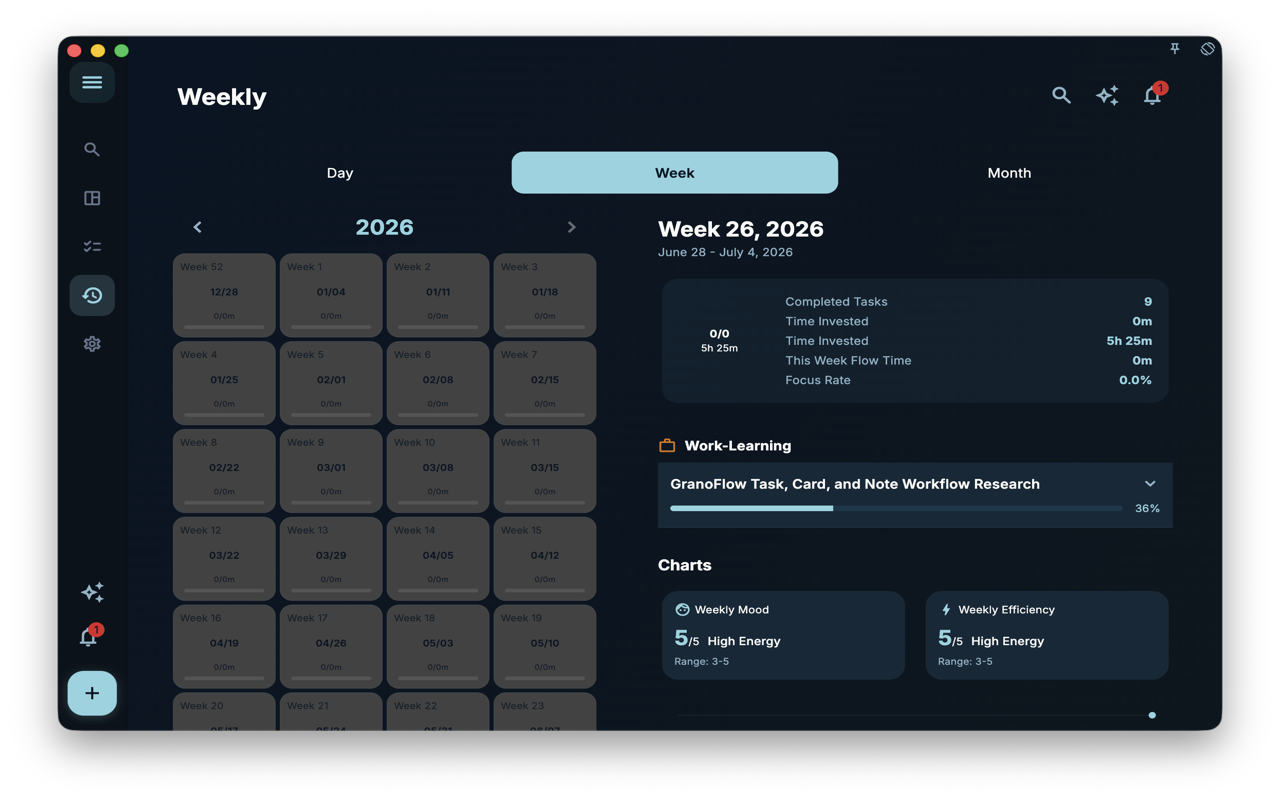
The weekly review brings together completion status, project progress, and charts for the week. It’s a good fit for answering “what has been happening repeatedly in recent days,” rather than retelling the entire seven days.
For example, you might be working on the same research project for several days, but each day’s record is short. Looking at a single day, it might just be “still organizing screenshots.” In the weekly review, you see it as a continuous thread of progress.
What to Write in Records
Section titled “What to Write in Records”Records have no fixed format. You can write very short entries or go into more detail. The key is that you can understand them later.
| Clue you want to leave | How you might write it | | --- | --- | | Why a task is blocked | “Materials aren’t ready yet; I’ll make up the screenshot list tomorrow.” | | Which arrangement worked | “Working through the inbox in the morning goes smoother than organizing it in the afternoon.” | | Entry point for tomorrow | “First open the project planning case; don’t start rewriting prompts.” | | Lessons worth noting | “When screenshot fails, first check the seed, then suspect the route.” |
Short and specific is usually more useful than complete but forced. You don’t need to record every emotion, task, and plan.
How to View Historical Records
Section titled “How to View Historical Records”| Action | What you’ll see | If you can’t find it | | --- | --- | --- | | Switch dates in the daily review | Tasks and records for that day | Check if the record was written on a different date | | View a week in the weekly review | Tasks and statistics for that week | Go back to a specific date to see the text details | | Use search | Related tasks, day/week/month review results | Try a more specific keyword |
If you roughly remember the time, start with the daily or weekly review to find the date; if you only remember keywords, use search.
A Real‑World Example
Section titled “A Real‑World Example”You remember working on “experience judgment after card exercises” before, but you’ve forgotten why you put it in the inbox at that time. First find that week in the weekly review, then go back to the specific date. The tasks tell you what you did; the records tell you why you did it then.
That’s the benefit of keeping records separate from tasks: tasks handle the facts, records capture your reasoning at that moment.
Boundaries
Section titled “Boundaries”- Records are not task comments; they don’t move with a particular task.
- Records are not daily report submissions; there’s no required format.
- Records are not backups. Important data should still be handled according to the data security chapter.
Next Steps
Section titled “Next Steps”If you want AI to first draft a daily or weekly note for you, continue to Note and Weekly Note Generation. If you want to adjust the reference direction AI uses when organizing, read Values and AI Research Preferences.