Values and AI Research Preferences
Value settings and AI research preferences are not meant for the system to decide your life direction. A more practical use is to provide a stable set of references for reviews, making it easier for tasks, notes, and AI drafts to connect back to what you care about.
Without this set of references, AI can easily tidy up a day into a pretty but hollow summary. Give it some direction, and it becomes more likely to organize materials around the projects, domains, and expression styles you truly care about.
What the three types of settings do
Section titled “What the three types of settings do”| Setting | Primary Impact | What it won’t do | | --- | --- | --- | | Domain value prompts | Helps AI understand domains and long-term direction | Won’t automatically change task ownership | | AI research preferences | Influences AI analysis perspective and expression style | Doesn’t mean AI is definitely correct | | Work/study report prompts | Makes daily reports and study reports more aligned with your use case | Won’t verify facts for you |
Domain Value Prompts
Section titled “Domain Value Prompts” Domain value prompts are suitable for writing “Why I care about this domain.” For example, you can explain that work and study are not just about completing tasks, but also about accumulating reusable experience, steadily advancing projects, and reducing repeated trial and error.
This kind of text doesn’t need to be written all at once. As you work on projects, write reviews, and build up knowledge cards, the long-term direction will gradually become clearer.
AI Research Preferences
Section titled “AI Research Preferences”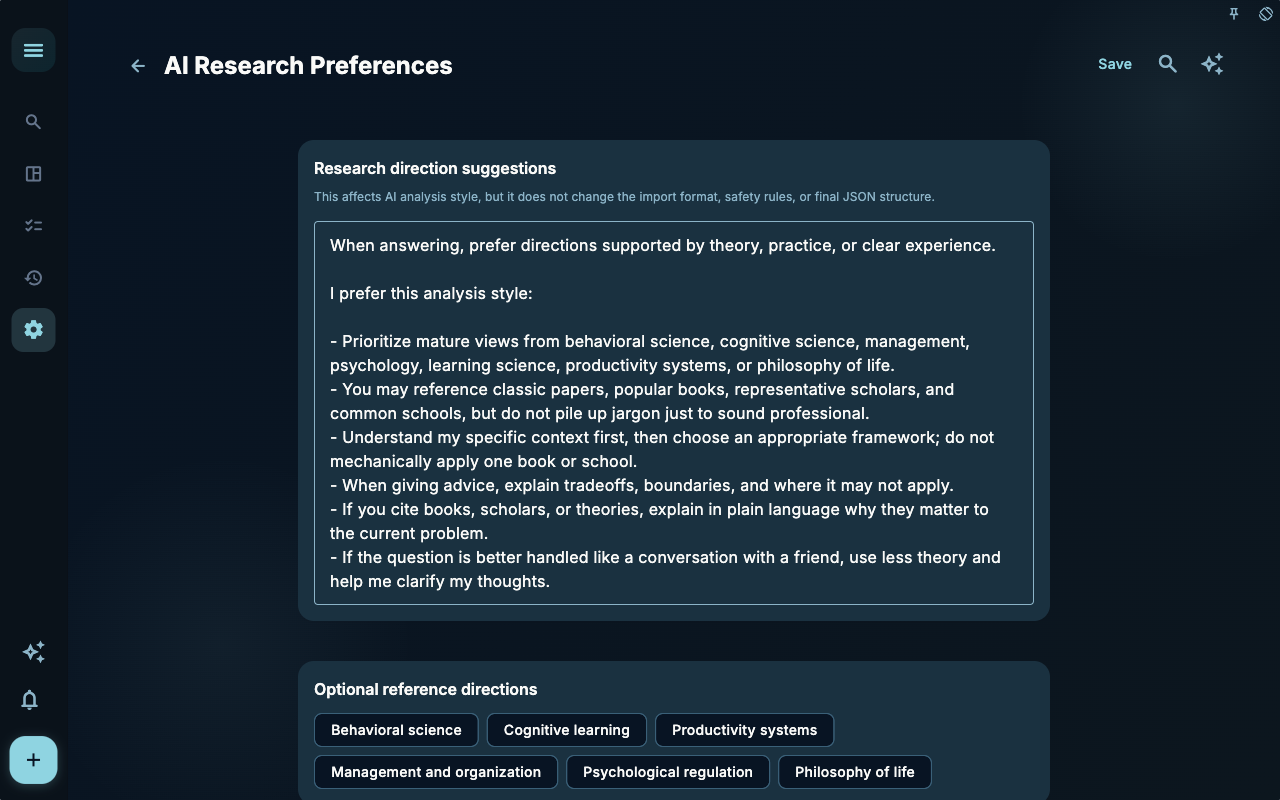 AI research preferences tell the AI what approach you prefer for organizing your notes. You can specify your preferred analytical perspectives, commonly used reference frameworks, writing habits, and also styles you dislike.
A workable write-up might look like:
Start from task and project facts, then distill next steps.Skip vague encouragement; instead, clarify applicable boundaries.If material is insufficient, point out the gaps directly—do not fill in the story.Work and Study Report Prompt
Section titled “Work and Study Report Prompt” The Work and Study Report prompt is suitable for handling external communication—for example, organizing the day’s tasks into a report that schools, teams, or clients can understand. It differs from a diary; a diary is for personal reflection, while a report typically needs to clearly state what was accomplished, what problems were encountered, and what the next steps are.
A Real Scenario
Section titled “A Real Scenario”You are organizing the Granoflow manual. Without preferences, the AI might simply write “Completed documentation optimization today.” If you specify in the research preferences something like “focus on whether screenshots support user actions and avoid templated expressions,” the AI is more likely to emphasize images, tasks, and user understanding.
This distinction matters: good preferences are not about making the AI praise you more, but about keeping it from going off track.
How to make changes more stable
Section titled “How to make changes more stable”| What to adjust | Suggested instruction | | --- | --- | | Want AI to be more specific | “First quote facts from the task and records, then give a judgment.” | | Want to reduce filler | “Don’t write generic encouragement; if material is insufficient, say it’s insufficient.” | | Want to align with long‑term direction | “Link the task to the areas, projects, and milestones I care about.” | | Want to keep boundaries | “Provide suggestions only as a draft; I will confirm them myself.” |
Don’t write preferences as a long system description. The longer it is, the more likely instructions conflict, and the harder it is to tell which one actually works.
Membership and boundaries
Section titled “Membership and boundaries”Some settings are available only to members. Non‑members can view the default configuration but cannot customize it.
These settings only affect the analytical direction, drafts, and question‑forming of future AI assistance. They do not change existing tasks, projects, records, or historical summaries. AI output still requires your confirmation, especially regarding timing, task status, and project facts.
Next Steps
Section titled “Next Steps”If you are adjusting how daily or weekly notes are generated, continue reading Daily and Weekly Note Generation. If you want to see how these preferences eventually feed back into your daily review, read Daily Review.